+1 (917) 565-8527

 info@indeedseo.com

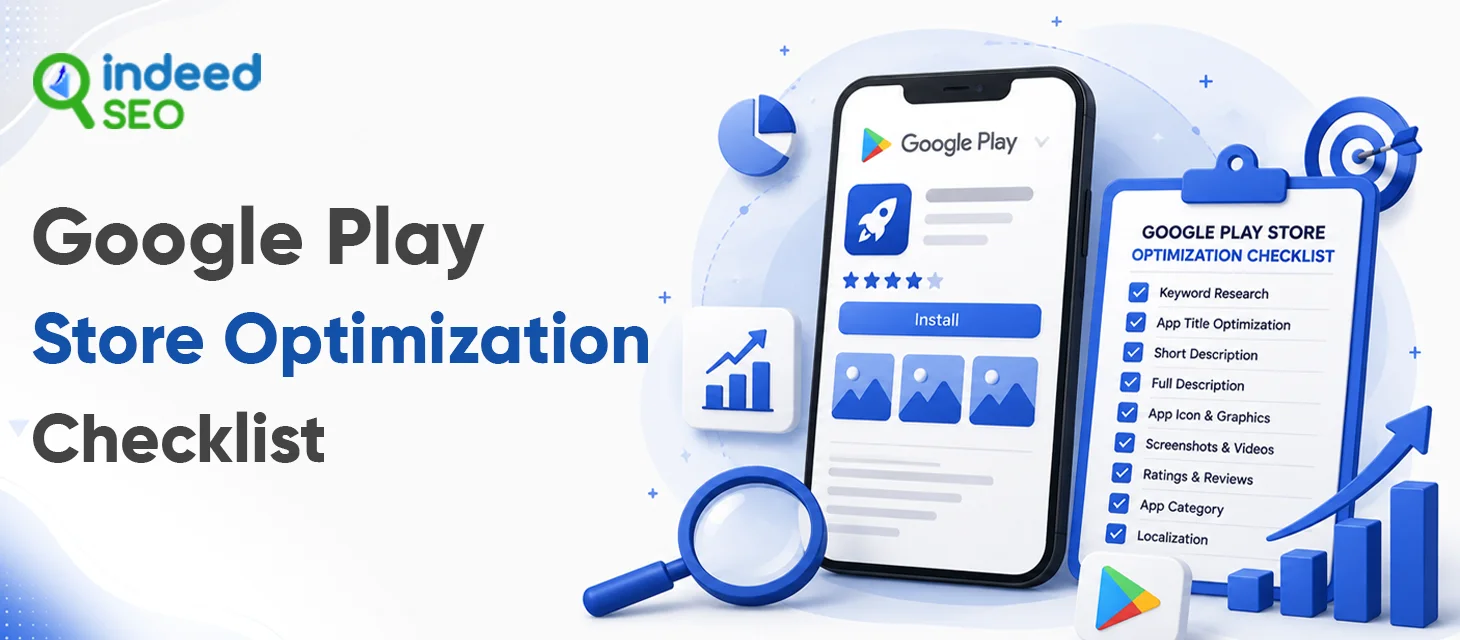
An effective Google Play Store Optimization (ASO) strategy requires balancing text indexing for algorithms with high-converting visuals for humans. Unlike iOS, Google Play crawls your entire store listing text dynamically for keyword indexing.
This complete Google Play Store optimization checklist covers metadata, creatives, technical signals, and conversion assets.
Grow your app with Google Play Store Optimization from IndeedSEO.
1. Start With the Right Keywords
Before you touch a single word on your listing, spend real time figuring out what people are actually typing into the search bar.
Think about how someone would actually search for an app like yours.
For example, someone looking for a budgeting app might search for “budget planner,” “expense tracker,” “money management app,” or “personal finance tracker.”
To build out your keyword list, look at:
- What your audience is genuinely searching for
- The keywords your competitors are already ranking for
- Longer, more specific search phrases
- The problems and questions your app actually answers
- Language tied to your core features
Core tip: Don’t chase high-search-volume phrases. A keyword only helps you if the people typing it are actually interested in what you’re offering.
2. Give Your App Title Some Thought (Max 30 characters)
Your app title does a lot of work in very little space.
It needs to tell people what your app does, sound natural, and ideally include a relevant primary keyword.
Take a meal-planning app as an example. A title that plainly says “meal planning” will usually beat a clever, brand name that leaves users guessing.
Keep it simple. Resist the urge to cram in every keyword you can think of.
Write for people first. Optimize for search second.
3. Make the Short Description Actually Useful (Max 80 characters)
Your short description is often the very first thing someone reads after tapping into your listing. Don’t waste it repeating your app’s name or listing features.
Instead, answer the one question that actually matters:
What’s in it for the user?
If you’re building a language-learning app, talk about the outcome building real conversation skills, actually remembering vocabulary, feeling more confident instead of just saying “lessons, quizzes, and flashcards.”
Add your main keyword naturally. If it doesn’t fit the sentence, don’t force it.
4. Write a Full Description People Actually Want to Read
The full description gives you more room to explain what your app does and why someone should care.
But that doesn’t mean you need to fill every available character.
Start with the most important information. Explain the problem your app solves, highlight the features users actually care about, and make the content easy to scan.
A solid structure to work from:
- What the app does
- Who it’s for
- The main benefits
- Key features
- What sets it apart
- A simple call to action
5. Don’t Underestimate Screenshots
Someone scrolling Google Play might decide whether to try your app within a few seconds. Your screenshots have to earn those seconds.
Don’t just grab random screens from your app. Think about what each individual image is actually communicating.
For instance:
Screenshot 1: What problem does this app solve?
Screenshot 2: What’s the standout feature?
Screenshot 3: What makes this different from everything else out there?
Together, your screenshots should tell a quick story about your product. Keep any text short, make the key point obvious at a glance, and be honest about what the app actually looks like.
6. Give Your Icon a Real Identity
Your icon is often the very first visual someone notices — and it doesn’t need to be complicated to work. In fact, simpler is often better.
A good icon is instantly recognizable, holds up at small sizes, and fits your brand. Skip the tiny text and the busy design elements. If the icon becomes difficult to understand when viewed small, it’s probably doing too much.
7. Pay Attention to Ratings and Reviews
Check your reviews regularly, and look for patterns rather than focusing on individual comments. If people keep mentioning crashes, confusing navigation, slow load times, or a missing feature that’s real, usable feedback.
Respond when it makes sense to. A thoughtful reply shows people there’s an actual team behind the app, not just a listing.
And don’t try to fake positive reviews. Real feedback, even the critical kind, is worth far more in the long run.
8. Think Beyond One Market
Planning to reach users outside your home country? Then your listing probably shouldn’t look identical everywhere.
People in different markets phrase things differently and a straight translation often misses how people actually search in that language.
Look at each market on its own terms. Consider localizing:
- App title
- Short description
- Full description
- Keywords
- Screenshots
- Promotional messaging
9. Keep Tabs on Your Competitors
You don’t need to copy anyone, but you should absolutely know what you’re up against.
Search your main keywords and see who’s showing up near the top. Look at how they’ve written their titles, what their screenshots emphasize, and what features they’re leading with. Then check their reviews — what are users praising, and what are they complaining about?
Competitor reviews in particular are gold. They’ll often tell you exactly what people wish an app did better — and that’s information you can use.
10. Test Instead of Guessing
One of the most common ASO mistakes is assuming you already know what users want.
Maybe you think one screenshot is stronger. Maybe another headline feels more convincing. Maybe a different icon looks better.
None of that matters as much as how users actually respond.
Things worth experimenting with:
- Screenshots
- App icons
- Feature graphics
- Messaging
- Any other eligible listing elements
11. Keep Watching the Numbers
ASO isn’t a one-and-done task. Competitors shift, search behavior evolves, your app changes, and so do user expectations.
Keep an eye on:
- Keyword rankings
- Store listing impressions
- Listing visitors
- Install conversion rate
- Organic installs
- Ratings and reviews
- Uninstall trends
- Retention
These numbers answer the questions that actually matter. Are people finding your app but not installing it? Are rankings climbing while downloads stay flat? Did that new screenshot actually move conversion? Is a keyword bringing in visitors who never install?
That’s far more useful than just watching your ranking go up and down.
How IndeedSEO Can Help With Google Play Store Optimization
IndeedSEO helps businesses strengthen app store presence by taking a holistic approach that goes beyond individual keywords to improve visibility, discoverability, and overall app performance.
Our ASO services include:
- Google Play Store audits
- Keyword research
- Competitor research
- App title optimization
- Short and long description optimization
- Metadata optimization
- Conversion-focused recommendations
- Review analysis
- Performance tracking
- Ongoing ASO improvements
Whether you’re gearing up for a launch or wondering why an existing app isn’t gaining traction, a proper ASO review can uncover exactly where you’re losing potential users.
Grow your app with Google Play Store Optimization from IndeedSEO.
Conclusion
Want to turn more Google Play searches into app installs? Connect with IndeedSEO for a customized ASO approach built around your app, your audience, and your growth goals.
Use this Google Play Store Optimization Checklist as your starting point, then keep refining based on what your audience actually does.